
To validate the format of an email address, test it against the regex below (test() in JavaScript, preg_match() in PHP). It accepts prenom.nom+tag@sous.domaine.fr and rejects double dots, spaces and domains without a top-level domain. It does not guarantee that the mailbox exists: for that, you have to send a message or query the domain.
La regex e-mail parfaite n'existe pas
Watch the Short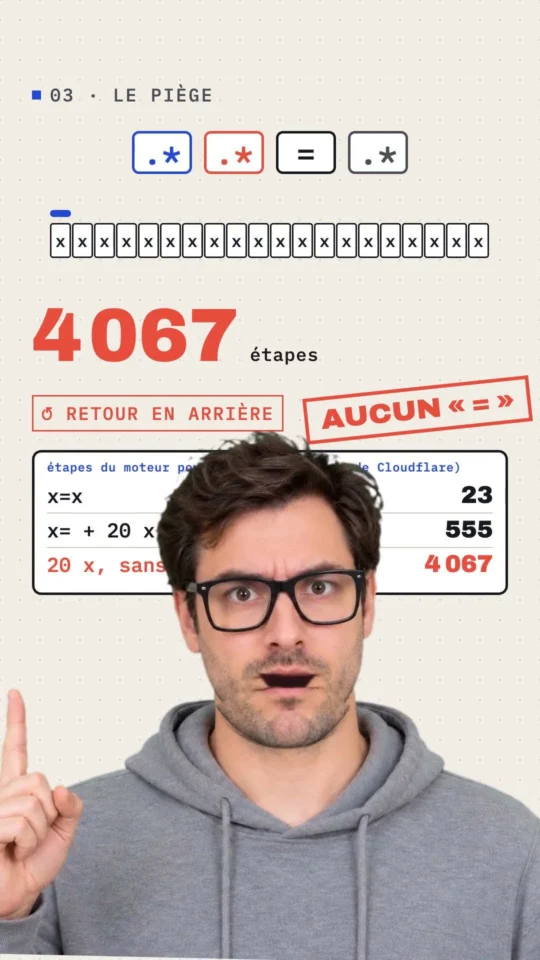
The Gekkode YouTube channel publishes more videos about AI and code.
Subscribe to support the channelAn email regex does one thing: it checks that a string has the shape of an email address. That is not much, and it is indispensable in every sign-up, contact or order form. Here is the regular expression I have used for years, with its JavaScript, PHP and HTML versions, and above all a detailed look at what it accepts and what it rejects.
The email regex, ready to copy
^(([^<>()[\]\\.,;:\s@"]+(\.[^<>()[\]\\.,;:\s@"]+)*)|(".+"))@((\[[0-9]{1,3}\.[0-9]{1,3}\.[0-9]{1,3}\.[0-9]{1,3}\])|(([a-zA-Z\-0-9]+\.)+[a-zA-Z]{2,}))$Read from left to right:
^and$: the whole string has to be an address, not merely contain one.[^<>()[\]\\.,;:\s@"]+: the local part (before the@) is made of permitted characters, with no spaces or reserved punctuation. Groups separated by a dot (prenom.nom) are accepted; a double dot is not.|(".+"): the quoted alternative, provided for by the standard, allows"jean dupont"@example.com.@, then the domain: either an IP address in square brackets ([192.168.1.1]), or alphanumeric labels separated by dots and ending in a top-level domain of at least two letters.
In October 2022 this rule replaced a version whose backslashes had gone missing when the site was migrated in 2021. If you copied the old one, replace it: it let malformed addresses through.
What the regex checks, and what it does not
The table below is the actual result of test() under Node.js 22 and of preg_match() under PHP 8.5 on sixteen addresses. Both engines return the same verdict.
| Address tested | Result | Why |
|---|---|---|
jean.dupont@example.com | accepted | the standard case |
jean+news@sub.example.co.uk | accepted | the + and subdomains are legitimate |
JEAN@EXAMPLE.COM | accepted | the i flag ignores case |
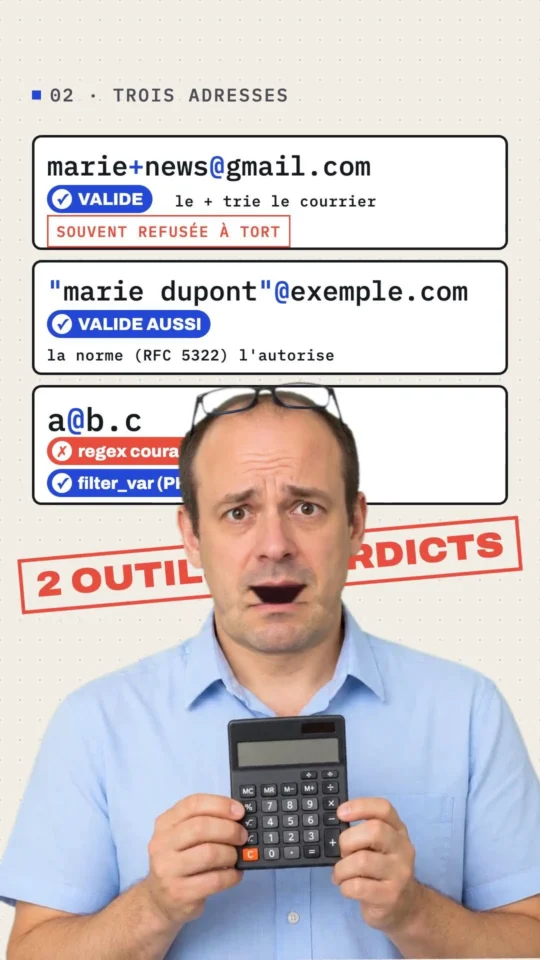
"jean dupont"@example.com | accepted | quoted local part, provided for by RFC 5322 |
jean@[192.168.1.1] | accepted | domain given as an IP address |
jéan@exemple.fr | accepted | the local part accepts non-ASCII characters |
jean@localhost | rejected | no top-level domain after the dot |
jean@example | rejected | same reason |
jean..dupont@example.com | rejected | double dot in the local part |
jean@exa_mple.com | rejected | underscores are not allowed in a domain name |
jean@exemple.café | rejected | accented top-level domain: see the limits |
a@b.c | rejected | single-letter top-level domain |
@example.com | rejected | empty local part |
jean@.com | rejected | empty domain before the top-level domain |
jean dupont@example.com | rejected | space |
jean@example.com (trailing space) | rejected | the $ anchor rejects any character after the top-level domain: remember to trim() |
What no regex can check: that the domain exists, that it accepts mail, and that the mailbox is active. personne@gmail.com has a perfect shape and most likely receives nothing.
JavaScript version
The function takes the address as a parameter, strips the surrounding whitespace and returns true or false. The i flag makes the match case-insensitive.
/**
 * Checks the format of an email address.
 * @param {string} email
 * @returns {boolean}
 */
function validateEmail(email) {
  const emailReg = /^(([^<>()[\]\\.,;:\s@"]+(\.[^<>()[\]\\.,;:\s@"]+)*)|(".+"))@((\[[0-9]{1,3}\.[0-9]{1,3}\.[0-9]{1,3}\.[0-9]{1,3}\])|(([a-zA-Z\-0-9]+\.)+[a-zA-Z]{2,}))$/i;
  return emailReg.test(String(email).trim());
}

console.log(validateEmail('jean.dupont@example.com')); // true
console.log(validateEmail('jean..dupont@example.com')); // false
console.log(validateEmail(' jean@example.com '));      // true, thanks to trim
In a form
The typical use case: block submission and show a message for as long as the address is malformed.
const form = document.querySelector('#inscription');
const champ = document.querySelector('#email');
const erreur = document.querySelector('#email-erreur');

form.addEventListener('submit', (event) => {
  if (!validateEmail(champ.value)) {
    event.preventDefault();
    erreur.textContent = 'Adresse e-mail invalide';
    champ.setAttribute('aria-invalid', 'true');
    champ.focus();
  }
});
The error field is a visible element next to the input, not an alert() box: the user keeps the context and can correct the address straight away.
PHP version
Client-side validation is an aid to data entry, not a security measure. The server has to run the check again: JavaScript can be disabled, and a form can be called directly. The same regex works with preg_match(), give or take the quotes.
/**
 * Checks the format of an email address.
 */
function isValidEmail(string $email): bool
{
    $pattern = '/^(([^<>()[\]\\\\.,;:\s@"]+(\.[^<>()[\]\\\\.,;:\s@"]+)*)|(".+"))@((\[[0-9]{1,3}\.[0-9]{1,3}\.[0-9]{1,3}\.[0-9]{1,3}\])|(([a-zA-Z\-0-9]+\.)+[a-zA-Z]{2,}))$/i';

    return preg_match($pattern, trim($email)) === 1;
}

var_dump(isValidEmail('jean.dupont@example.com')); // bool(true)
var_dump(isValidEmail('jean@localhost'));          // bool(false)
Note the double escaping of the backslashes in the single-quoted PHP string: \\\\ in the code produces \\ in the pattern, which means “a literal backslash” to the regex engine.
Regex or filter_var?
PHP provides filter_var($email, FILTER_VALIDATE_EMAIL), which follows the standard more closely. Both approaches are valid; they do not rule in quite the same way:
| Address | This article’s regex | filter_var |
|---|---|---|
a@b.c | rejected | accepted |
"jean dupont"@example.com | accepted | rejected |
jéan@exemple.fr | accepted | rejected without FILTER_FLAG_EMAIL_UNICODE, accepted with it |
jean+news@sub.example.co.uk | accepted | accepted |
For a public form, filter_var with the Unicode flag is a sound default; the regex remains useful when you want exactly the same rule in JavaScript and in PHP.
HTML version
The browser already knows how to validate an email: type="email" refuses to submit the form if the format is wrong, and displays its own message. The pattern attribute lets you add a stricter rule, this article’s for instance.
<label for="email">Adresse e-mail</label>
<input
id="email"
name="email"
type="email"
required
autocomplete="email"
pattern="(([^<>\(\)\[\]\\.,;:\s@"]+(\.[^<>\(\)\[\]\\.,;:\s@"]+)*)|(".+"))@((\[[0-9]{1,3}\.[0-9]{1,3}\.[0-9]{1,3}\.[0-9]{1,3}\])|(([a-zA-Z\-0-9]+\.)+[a-zA-Z]{2,}))"
title="Une adresse de la forme prenom.nom@domaine.fr"
>Four details: pattern is implicitly anchored, so you must not write ^ and $; the quotes in the pattern are written " so as not to close the attribute; browsers compile pattern with the v flag, which requires parentheses and square brackets inside a character class to be escaped (\(\)\[\]), otherwise the pattern is silently ignored; and HTML validation can be bypassed with one line in the console. It improves the user experience; it does not replace the server-side check.
Edge cases worth knowing
- The
+:jean+boutique@gmail.comis a valid address that many people use to sort their mail. A regex that rejects it loses sign-ups. - Long top-level domains:
.photography,.parisand.technologyexist. That is why the pattern ends in[a-zA-Z]{2,}rather than a closed list of extensions. - Accents: the local part accepts them; the domain does not in this regex (internationalised domain names are actually written in Punycode,
xn--…, before being resolved). - Surrounding whitespace: copying and pasting from a spreadsheet often adds a trailing space. Call
trim()before the test, as both functions above do. - Case: the domain is case-insensitive; the local part is case-sensitive in theory, but no mainstream provider makes the distinction. Comparing in lower case is the expected behaviour.
Testing the regex before deploying it
A test set beats proofreading. In JavaScript, a loop over known addresses is enough:
const cas = {
  'jean.dupont@example.com': true,
  'jean+news@sub.example.co.uk': true,
  'jean@localhost': false,
  'jean..dupont@example.com': false,
  'jean dupont@example.com': false,
};

for (const [email, attendu] of Object.entries(cas)) {
  const ok = validateEmail(email) === attendu;
  console.log(`${ok ? 'OK ' : 'KO '} ${email}`);
}
To explore a pattern, regex101 colours each group and explains what it captures. Pick the ECMAScript flavour for JavaScript and PCRE2 for PHP: both accept this regex without modification.
Going further: checking that the address exists
Once the shape is right, three further checks cut down on fake addresses, from the cheapest to the most reliable:
- Reject disposable domains (temporary addresses created to get around a sign-up) using a maintained list.
- Query the domain’s MX records on the server: a domain with no mail server will never receive a message. In PHP,
checkdnsrr($domaine, 'MX')answers in one line. - Send a confirmation email with a link to click. It is the only proof that someone reads that mailbox, and it is what every serious service does.
The first two checks are the ones I run on Foliade’s public forms; the third remains the reference as soon as an account is created.
The other validation regexes
Same approach, other formats: validating a date, an IP address, a postcode or a password.
Common errors
test() accepts “bonjour jean@example.com merci” because a valid address appears somewhere in the string. The function in this article anchors the regex at both ends.jean+newsletter@…) or new long top-level domains such as .photography. Always test with real addresses before tightening the rule.