
Before you can start manipulating the DOM, you need to understand what it is and how it works. The DOM (Document Object Model) describes how browsers must build a model of an HTML page, and how JavaScript can reach and update the contents of that model. The model is a tree whose elements are linked to one another, and it is held in the browser’s memory while the page loads. The DOM is made up of four types of node.
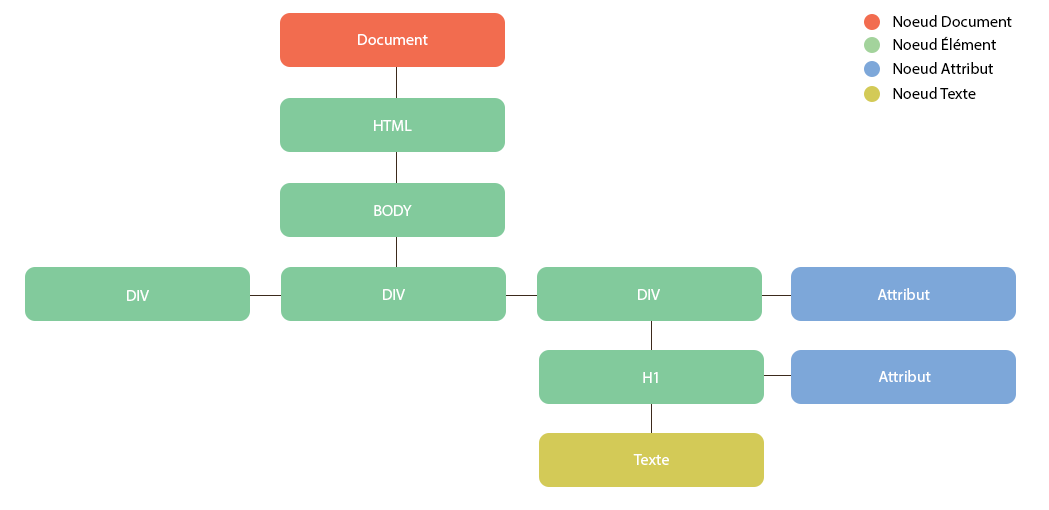
This article may be updated from time to time
If you have questions or remarks, do leave a comment.
Document
The document node is the starting point: it is from this node that you reach every element of the DOM. It is also the Document object, which provides a range of methods for getting at elements. ( e.g. document.querySelector(‘div.exemple’); )
Element
HTML elements describe the structure of an HTML page. To work your way into the DOM tree, start by looking for elements through Document. Once you have found the element you want, you can reach its text and attribute nodes.
Attribute
The opening tags of HTML elements can carry attributes ( for example: id, class, … ) and those are represented as attribute nodes in the DOM tree. Attribute nodes are not children of the element that carries them. They are part of that element, and cannot have children of their own. Once you have hold of an element, specific JavaScript methods and properties let you read or change its attributes.
Text
As with the attribute node, you reach a text node through an element node and, again like attribute nodes, text nodes cannot have children.
Reaching elements
Before we can change an element, we have to be able to reach it, and there are plenty of methods for moving through the DOM and changing it.
Selecting one element
getElementByld(): reaches an element through its ID attribute.querySelector(): returns an element matching a CSS selector.
Selecting several elements
These methods return our elements as an array
getElementsByClassName(): returns several elements through a class.getElementsByTagName(): returns several elements through an HTML tag ( e.g.:<div>) .querySelectorAll(): returns several elements matching a CSS selector.
Moving from one node to another
parentNode: returns the parent element of the current element.childNodes: returns a list of the current element’s children.previousSibling: returns the element before the current one.nextSibling: returns the element after the current one.firstChild: returns the first child element of the current element.lastChild: returns the last child element of the current element.
Working with attributes
Once you have reached your element, you have reached its attributes and their values, with a set of methods for working on them.
id
id: gets or sets the id of the element
Class
className: gets or sets the class of the element.classList: returns an array listing the classes of the elementadd: add a class to the listremove: take a class out of the listtoggle: add or remove a class (it alternates, adding it if it is not there and removing it if it is).contains: returns a boolean, true if a class is in the list.
Attributes in general
hasAttribute(): returns a boolean, true if the attribute exists on the current element.getAttribute(): returns the value of an attribute.setAttribute(): adds an attribute to the element, with its value as the second argument.removeAttribute(): takes an attribute off the element.
Reading values.
nodeValue: returns the content of a node, on a paragraph it returns its text, but if the node is an attribute it returns the value of that attribute.innerText: gets the text, ignoring the markup.innerHTML: gets the text along with the markup of the node.textContent: returns the text likeinnerText, plus the<script>and<style>content, unlikeinnerText.
Adding elements in 3 steps
One of the most important things when you work with the DOM is being able to create new elements, and a complete element is built in three steps:
createElement(): you start by creating a new element node with thecreateElement()method. That element node is stored in a variable.javascriptvar element= document.createElement("p");createTextNode():createTextNode()creates a new text node. Again, the node is stored in a variable, and it can be added to the element node with theappendChild()method.javascriptvar texte = document.createTextNode("Lorem Ipsum");appendChild(): now that you have your element, with or without content in a text node, you can add it to the DOM tree with this method.javascriptvar element = document.createElement('p'); var texte = document.createTextNode('Lorem Ipsum'); element.appendChild(texte); document.body.appendChild(element);
The write method
You may have heard of the document.write method for putting markup and text into a document. It brings plenty of drawbacks and problems with it, though, because it only works while the page is loading for the first time, once the page is loaded, it can cause all sorts of trouble.
- Wiping out the whole page
- Not adding the content to the page
- Creating a new page
Removing an element in 3 steps
Just as we add an element to the DOM, we sometimes have to take one out of it.
- To do that, you first store the element you want to remove in a variable.
javascript
var removeElement= document.getElementById('monId'); - Then, from that variable, you reach the parent element with the
parentNodeproperty .javascriptvar parentElement = removeElement.parentNode; - With this second variable, you can remove the element you stored in the first step.
javascript
var removeElement= document.getElementById('monId');
var parentElement = removeElement.parentNode;
parentElement .removeChild(removeElement);