Imagine you own a building and you want only a handful of people to have keys, while still keeping them out of certain corners of it. Now imagine your WordPress site is that building, and that you would rather not everybody had the run of it. With the dashboard, a code snippet and a few WordPress plugins, you can restrict access to your WordPress dashboard without much trouble. Let us look at how.
Why should you restrict access to your dashboard?
Chances are you have no problem at all with people reaching your WordPress dashboard. But you may not want everybody to get into it, or you may not want to let them edit the theme or the plugins.
In another scenario, if you run a blog with several authors, you may want to limit what those authors can reach. Whatever the case, there are times when you need to control who has access.
So let us look at how you can restrict access to your dashboard.
Roles and permissions to control access:
WordPress makes this easy by defining roles and the actions that go with them, such as writers, editors, moderators and so on. You can change a user’s role at any time and adjust what they can reach in your WordPress dashboard.
Letting new users manage their profile and read the content on the front end is very easy. All you have to do is change their role to subscriber – and you can do all of that from the WordPress admin panel by going to Settings. From there, go to General and set New User Default Role to Subscriber.
 From Users and then All Users you can also change the role of any existing user. You can even select several users at once and restrict their access in one go.
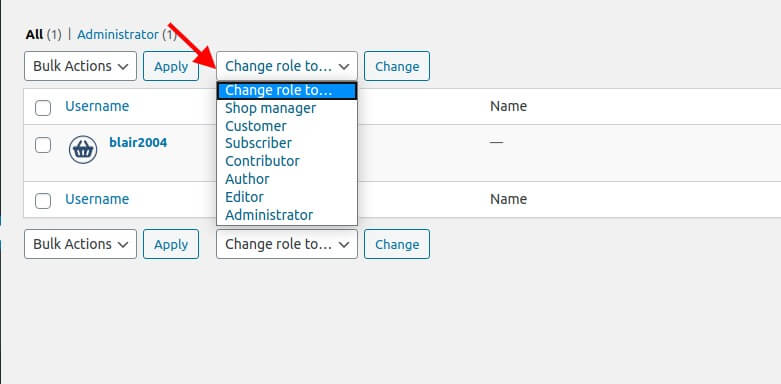
There are four types of user role in WordPress:
- The subscriber can only read posts and manage their own profile.
- The contributor can write and manage their own posts, but cannot publish them.
- The author can manage and publish their own posts.
- The editor can publish and manage the posts of every writer.
- Admin or Super Admin is allowed full access to the administrative features of the site. Super Admin is meant for multisite installs.
Restricting access with a code snippet:
The code below goes into the functions.php file of your child theme. It restricts what your users can reach on your site: they are sent back to the home page.
add_action( ‘init’, 'block_users' );

function block_users() {
     if (
           is_admin()
           ! current_user_can( ‘administrator’ )
           ! ( defined( ‘DOING_AJAX’ )  DOING_AJAX )
     ) {
           wp_redirect( home_url() );
           exit;
     }
}