A JavaScript sleep() Function in One Line
Watch the ShortThe Gekkode YouTube channel publishes more videos about AI and code.
Subscribe to support the channelProgramming moves fast, and JavaScript has made itself one of the most popular and most versatile languages around. One of the features developers keep looking for in JavaScript is a way to pause the code, or, as it is usually put, to make it “sleep” for a moment. That is where the idea of “JavaScript sleep” comes in.
function sleep(ms) {
  return new Promise(resolve => setTimeout(resolve, ms));
}
JavaScript sleep: a well-earned pause in the flow of your code
What is JavaScript sleep?
Put simply, “JavaScript sleep” is a function that pauses the execution of your JavaScript code for a given amount of time. It is worth pointing out, though, that JavaScript is non-blocking and asynchronous by nature, and has no native “sleep” function like some other programming languages do.
How does JavaScript sleep work?
“Sleep” in JavaScript can be built with promises and the setTimeout function, a built-in JavaScript function that sets a delay before a given function runs. “Sleep” in JavaScript is mostly used in an asynchronous context, in particular alongside async functions and the await keyword.
A practical JavaScript sleep example
Say you are building a web application and you need to delay one particular action, such as showing a message to the user. You could use “JavaScript sleep” like this:
function sleep(ms) {
  return new Promise(resolve => setTimeout(resolve, ms));
}

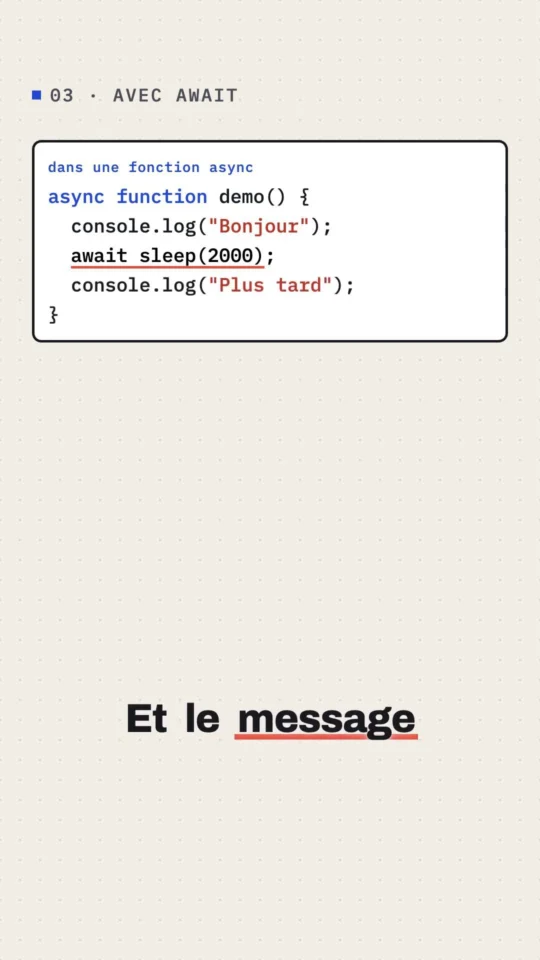
async function demo() {
  console.log('Bonjour, utilisateur !');
  await sleep(2000);
  console.log('Comment ça va ?');
}

demo();
In this example, the demo function first prints the message “Bonjour, utilisateur !”, then waits two seconds (2000 milliseconds) thanks to the sleep function, before printing the message “Comment ça va ?”.
The sleep function in JavaScript: for better or for worse?
Upsides of JavaScript sleep
“JavaScript sleep” has several things going for it. First of all, it gives you control over the flow of your code and lets you delay certain actions, which is handy in plenty of situations. If you want to show the user a series of messages with a delay between each one, for instance, “sleep” in JavaScript is a perfect fit.
Downsides of JavaScript sleep
Using a “sleep” function in JavaScript does come with drawbacks. Since JavaScript is non-blocking, using “sleep” can potentially block the rest of your code from running, which leads to poorer performance and a degraded user experience. So this function has to be used with care.
FAQs
Can I use JavaScript sleep inside a loop?
Yes, you can use “sleep” in JavaScript inside a loop. Keep in mind, though, that it could block the rest of your code from running. The usual advice is to reach for async functions and promises to handle asynchronicity inside a loop.
Is JavaScript sleep the same thing as setTimeout?
No, “sleep” in JavaScript and setTimeout are not quite the same thing. setTimeout is a function that sets a delay before another function runs, whereas “sleep” in JavaScript is usually built on top of setTimeout combined with promises, to pause the execution of the code.
Does JavaScript sleep block the rest of the code?
Yes, “sleep” in JavaScript can block the rest of your code from running, especially if you use it carelessly. That is why it is best used together with async functions and promises.
Is there a native sleep function in JavaScript?
No, unlike some other programming languages, JavaScript has no native “sleep” function. You can, however, write your own “sleep” function using promises and the setTimeout function.
Is JavaScript sleep bad for my application’s performance?
Using “sleep” in JavaScript is not necessarily bad for your application’s performance, but it can become so if you overuse it without care. That is exactly why it pays to understand how to use this function properly.
Conclusion
All in all, “JavaScript sleep” is a powerful way to control the flow of your code. It does have to be handled properly, though, or performance problems follow. Once you understand how asynchronicity works in JavaScript and use the right techniques, you can get the most out of this function.
In the end, “JavaScript sleep” is like a good night’s sleep: it does you good when it is used wisely. So take the time to understand how it works and how to fit it into your projects. You will see, your code will run like a dream!