
A skill is a folder containing a SKILL.md: a YAML frontmatter (name, description) plus Markdown instructions, along with scripts and references loaded on demand. Only the description stays in context permanently, and it gets truncated, which makes it the only trigger that matters. The same folder works in Claude Code, Codex, Copilot and OpenCode, as long as you put it in the right directory.
What Is an AI Agent Skill? (SKILL.md)
Watch the ShortThe Gekkode YouTube channel publishes more videos about AI and code.
Subscribe to support the channelA skill is a folder containing a SKILL.md file. Writing it is the easy part. The rest means knowing where to put it so the agent finds it, checking that it actually triggers, and measuring what it costs the rest of the time. This guide does all three, on a skill built and run specifically for it.
What exactly is a skill?
The Agent Skills format was created by Anthropic and then published as an open standard. The specification now lives at agentskills.io. It comes down to very little: a folder, a mandatory SKILL.md, and whatever else you want alongside it.
regex-verifiee/
├── SKILL.md          # required: YAML frontmatter + Markdown instructions
├── scripts/          # optional: code the agent runs
├── references/       # optional: documentation loaded on demand
└── examples/         # optional: templates, sample data
The frontmatter is short and constrained. name: 64 characters at most, lowercase letters, digits and hyphens only, no leading or trailing hyphen, no double hyphen, and it has to match the parent folder’s name exactly. description: required, 1,024 characters at most, it states what the skill does and when to use it. Three optional fields round it out: license, compatibility (500 characters) and metadata. A sixth, allowed-tools, is marked experimental in the specification.
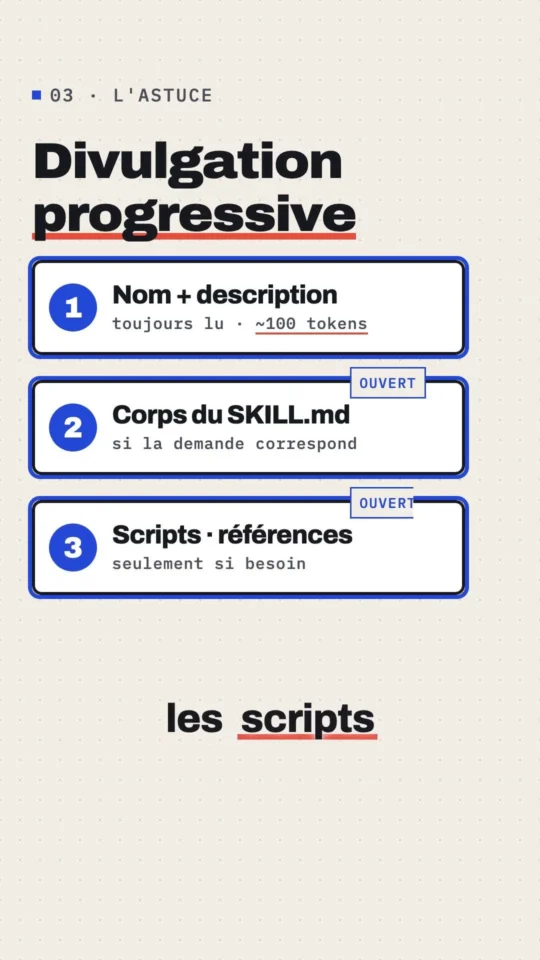
The mechanism that makes this interesting is called progressive disclosure, in three levels. At startup, the agent only loads the name and description of each skill. The specification targets around a hundred tokens. When a task matches, it reads the body of the SKILL.md (under 5,000 recommended tokens, 500 lines maximum). Only then, if it needs to, does it open the files in scripts/, references/ or assets/. Anthropic’s engineering post from 16 October 2025 puts it the other way round: get the name and description right, because that’s what the agent uses, and only that, to decide whether to trigger the skill.
A skill that never triggers therefore still costs its description, every session, in every context window. That’s exactly what Claude Code’s /skill-doctor command measures, and it’s the first expense examined in Spotify’s write-up on its token bill.
Where does each agent look for skills?
This is the part nobody gets right, because it changes from tool to tool. Here are the paths as they appear in each vendor’s documentation, accessed on 7 September 2026.
| Tool | Project | User |
|---|---|---|
| Claude Code | .claude/skills/<nom>/SKILL.md | ~/.claude/skills/<nom>/SKILL.md |
| Codex | .agents/skills/ (and .codex/skills/, see below) | $CODEX_HOME/skills, ~/.agents/skills |
| GitHub Copilot | .github/skills, .claude/skills, .agents/skills | ~/.copilot/skills, ~/.agents/skills |
| OpenCode | .opencode/skills, .claude/skills, .agents/skills | ~/.config/opencode/skills, ~/.claude/skills, ~/.agents/skills |
Two things follow from this. .agents/skills is turning into the common neutral path, Codex, Copilot and OpenCode all three read it. And Copilot and OpenCode also read .claude/skills, Claude Code’s folder serving as the de facto exchange format. So the same skill folder can serve several agents without being duplicated. On the surface side, GitHub lists skills for the cloud agent, code review, Copilot CLI, the GitHub Copilot app, and agent mode in VS Code and the JetBrains IDEs.
On 7 September 2026, agentskills.io’s showcase lists 46 compatible products, from Cursor to Goose by way of Junie, Kiro, Roo Code, Laravel Boost, OpenCode and OpenClaw.
Building a skill that’s actually useful: regex-verifiee
A good skill encodes a procedure you repeat, one the agent skips whenever you don’t force it to follow it. The case chosen here: regular expressions. An agent will hand you a regex in three seconds, without ever running it against a counter-example. The regex-verifiee skill rules that kind of answer out.
The SKILL.md, in full for the frontmatter and the start of the body:
---
name: regex-verifiee
description: Écrire une expression régulière et la prouver avant de la livrer. À utiliser dès qu'une demande porte sur une regex, une expression régulière, une validation de format (code postal, SIRET, IBAN, e-mail, téléphone, slug, plaque), un preg_match, un preg_replace ou un RegExp. Impose un fichier de cas valides et invalides, son exécution dans le moteur cible (Node et PHP), puis la livraison regex + tableau de cas + limites.
---

# Regex vérifiée

Une regex qui n'a jamais tourné sur ses contre-exemples n'est pas une regex, c'est une intuition.
Suivez ces cinq étapes dans l'ordre. Ne sautez pas l'étape 4.

## Procédure

1. **Cadrer.** Demandez, ou décidez explicitement : le moteur (JavaScript, PCRE/PHP, POSIX), la
   chaîne testée (déjà nettoyée ou brute), et si la valeur peut être vide.
2. **Proposer.** Écrivez la regex ancrée et, en une phrase par groupe, ce que chaque partie accepte.
3. **Écrire les cas.** Créez un fichier JSON : au moins six valides et six invalides. Les invalides
   doivent inclure les pièges de `references/cas-types.md` pour le type de donnée concerné.
4. **Exécuter.** Lancez le script sur les deux moteurs et collez la sortie brute dans la réponse.
5. **Livrer.** Réponse finale = la regex + le tableau de cas produit par le script + les limites.
The description is deliberately chatty with trigger vocabulary: “regex,” “regular expression,” “postal code,” “SIRET,” “preg_match,” “RegExp.” Those are the words the reader actually types. Write it in the language people talk to you in, not the language of the documentation.
The folder then holds a JSON case file, two runners (one in Node, one in PHP) that read the same file, and a references/cas-types.md reference that lists counter-examples by data type. The case file looks like this:
{
  "name": "code postal français",
  "engine": "both",
  "pattern": "^(?:0[1-9]|[1-8]\\d|9[0-8])\\d{3}$",
  "flags": "",
  "valid": ["01000", "20000", "62500", "75001", "97400", "98000"],
  "invalid": ["", "00000", "99999", "7500", "750011", "75 001", "2A000", " 75001", "75001\n"]
}
Both runners print the same table and return a non-zero exit code as soon as one case fails. That exit code is what does the work: the agent can’t wrap up on a command that errored.
First surprise, found by running the harness myself before even bringing an agent into it: the same regex doesn’t give the same verdict in the two engines.
$ node scripts/verifier.mjs examples/code-postal-fr.json
moteur : node v22.23.2
regex  : /^(?:0[1-9]|[1-8]\d|9[0-8])\d{3}$/
...
"75001\n"  false    false   ok

15 cas, 0 échec(s)

$ php scripts/verifier.php examples/code-postal-fr.json
moteur : PHP 8.4.19, PCRE 10.47 2025-10-21
regex  : /^(?:0[1-9]|[1-8]\d|9[0-8])\d{3}$/
...
"75001\n"  false    true    ECHEC

15 cas, 1 échec(s)
In PCRE, $ accepts a trailing newline, in JavaScript, it doesn’t. A form field that arrives with a \n stuck on the end will pass PHP validation and fail JavaScript validation, with the exact same expression written in both files. Two fixes, both verified here: the D modifier on the PHP side (preg_match('/^\d{5}$/D', "75001\n") returns 0), or a portable anchor, (?![\s\S]) instead of $, which passes all fifteen cases in both engines.
Testing it with Codex without touching ~/.codex
Codex’s documentation describes a stack of roots: $CWD/.agents/skills, the parent folders, $REPO_ROOT/.agents/skills, then $HOME/.agents/skills, /etc/codex/skills, and the skills shipped with the CLI. In other words, a project-level skill is a real thing: no need to write to ~/.codex/skills or ~/.codex/config.toml just to try one out.
That leaves checking what the binary actually does. Codex exposes a debug command for exactly that, which shows the prompt exactly as the model receives it, without calling the model:
$ mkdir -p demo-projet/.codex/skills
$ cp -R regex-verifiee demo-projet/.codex/skills/
$ cd demo-projet && codex debug prompt-input "test"

### Skill roots
- `r0` = `/…/demo-projet/.codex/skills`
- `r1` = `/Users/gekkode/.codex/skills`
- `r2` = `/Users/gekkode/.agents/skills`
- `r3` = `/Users/gekkode/.codex/skills/.system`
- `r4` … `r10` = caches de plugins
### Available skills
- regex-verifiee: Écrire une expression régulière et la prouver avant de la livrer. À utiliser dès qu'une deman (file: r0/regex-verifiee/SKILL.md)
The skill is seen, from <projet>/.codex/skills, a path the documentation doesn’t mention, but that the binary does scan, and in first position too. Dropping a second, canary skill into <projet>/.agents/skills made an r11 root appear with that path: both work, and the .codex/ folder comes first.
Now for the real test. Same prompt, same model, same machine, a few minutes apart: once inside the project that holds the skill, once inside an empty folder.
codex exec -m gpt-6-astra -s workspace-write --skip-git-repo-check \
  "Dans un formulaire PHP, je dois valider le code postal saisi par le visiteur. Donne-moi l'expression reguliere a utiliser."
Without the skill: 19 seconds, zero commands run, and this answer, preg_match('/\A[0-9]{5}\z/', $codePostal), with a sentence saying the expression checks the format, not whether the postal code actually exists. Run through the harness, this regex fails two cases out of fifteen: it accepts 00000 and 99999.
With the skill: 106 seconds, ten commands run. Codex read the SKILL.md, then the two scripts, then references/cas-types.md, the full progressive disclosure, level by level. It then wrote its own case file (eighteen cases, including "75001\n00000" and "2a000", pulled from the reference), ran both runners, and delivered this:
$codePostal = $_POST['code_postal'] ?? '';

$valide = is_string($codePostal)
    && preg_match('/\A(?:0[1-9]|[1-8][0-9]|9[0-8])[0-9]{3}\z/', $codePostal) === 1;
Below that, the two eighteen-case tables and a “limitations” section. Note that it didn’t use the same expression in both engines. \A … \z for PCRE, ^ … (?![\s\S]) for JavaScript. The skill never told it to do that, it worked it out by running the cases.
So a skill of about sixty lines turned a three-second answer, wrong on two cases, into a two-minute procedure whose result can be checked. The trigger happened on its own, off the description alone: the prompt contains neither the word “skill” nor the name regex-verifiee. In Codex, you can also force the issue with $regex-verifiee in the prompt, in Claude Code, with /regex-verifiee.
How much does a description cost, and why it gets cut
During the run, Codex issued a warning I wasn’t expecting:
Skill descriptions were shortened to fit the skills context budget. Codex can still see every skill, but some descriptions are shorter. Disable unused skills or plugins to leave more room for the rest.
Checked with a canary skill whose description is a run of three hundred known characters: on this machine, with 146 skills installed, every description gets cut to 94 characters. My 422-character description therefore reaches the model two-thirds amputated, cut off mid-word in “demande.” Everything that comes after that does nothing for triggering: “SIRET,” “IBAN,” “preg_match,” “RegExp.”
The budget is adjustable. Codex accepts a skills.max_context_tokens key, which you can pass as an override without writing to the configuration file:
codex debug prompt-input -c skills.max_context_tokens=16000 "test"| Budget | Description length kept | Size of the skills block |
|---|---|---|
| 2,000 | 40 characters | 8,202 characters |
| 4,000 | 54 characters | 16,492 characters |
| 5,000 | 82 characters | 20,482 characters |
| default | 94 characters | 22,230 characters |
| 8,000 | 198 characters | 32,295 characters |
| 16,000 | 300 characters (no truncation) | 40,201 characters |
Two rules fall out of this. Put the trigger words in the first ninety characters of the description, everything else is a bonus. And bear in mind that the more skills you install, the more you shave off everyone else’s description. The catalogue here took up 22,230 characters of context, every session, for 146 skills of which I actually use only a handful. Uninstalling beats raising the budget.
Claude Code applies the same principle with published numbers. Its listing budget is worth 1% of the model’s context window, adjustable via skillListingBudgetFraction or the SLASH_COMMAND_TOOL_CHAR_BUDGET environment variable. Every entry is capped regardless: description and when_to_use concatenated get cut at 1,536 characters, a ceiling adjustable via skillListingMaxDescChars. And when the listing overflows, the documentation is explicit about the sacrifice order: Claude Code drops the descriptions of the skills you invoke least, first. The name always stays in the listing, though.
Both tools offer the same way out: disabling rather than inflating the budget. On the Claude Code side, the skillOverrides setting accepts four states per skill, on, name-only (the name without the description), user-invocable-only and off, and the /skills command writes them for you into .claude/settings.local.json. On the Codex side, a block in ~/.codex/config.toml:
[[skills.config]]
path = "/chemin/vers/le/skill/SKILL.md"
enabled = false
Loading and distributing the same skill in Claude Code
The folder itself doesn’t change. Two locations, depending on whether the skill follows you everywhere or belongs to the repo:
cp -R regex-verifiee ~/.claude/skills/          # for all your projects
cp -R regex-verifiee mon-projet/.claude/skills/ # versioned with the repo
Claude Code’s documentation adds frontmatter fields that aren’t in the specification. disable-model-invocation: true stops automatic triggering and reserves the skill for a manual call via /nom, the right setting for anything that pushes, deploys or deletes. allowed-tools grants tool permissions for just the conversation turn that invokes the skill, and the permission lapses at the next message. user-invocable: false reserves the skill for the model.
To distribute the skill to a team, the packaging is a plugin: a .claude-plugin/plugin.json manifest at the root, the skill inside the skills/ folder, and a .claude-plugin/marketplace.json file that declares the marketplace. Installing it is then done via /plugin marketplace add compte/depot and then /plugin install mon-plugin@ma-marketplace, and /reload-plugins reloads without leaving the session.
That leaves the awkward question. Does your skill actually trigger, and is it any good? Claude Code answers both halves. /skill-doctor, which requires version 2.1.252 or later, lists the loaded skills, how many times each was invoked and when it was last used, and flags the ones that never served a purpose. The report opens in the Stats tab of the plugin manager, and prints as plain text in -p mode. And claude plugin eval, in early access, automates exactly the comparison I did by hand above. The command’s help, on this machine, leaves no doubt:
$ claude plugin eval --help
Run eval cases (evals/**/case.yaml or evals/**/prompt.md + graders/*.md) against
a plugin and report scored results.

  --ablation <mode>   Run a no-plugin baseline arm and report the score delta
                      (none | with-without; default: with-without …)
  --runs <n>          Override per-case runs (default: case.runs ?? 3)
  --threshold <0..1>  Exit 1 if any case score is below this threshold
  --json              Emit aggregate-result.json to stdout (for CI)
An eval case is a folder, evals/<cas>/, holding a prompt.md, a realistic prompt that above all doesn’t name the skill, and graders under graders/. The --ablation with-without option replays each case with and without the plugin and shows the score gap: it’s the only honest way to prove a skill actually adds something.
Sharing a skill, and checking other people’s
Three distribution routes coexist. A plain Git repo, cloned into the right folder, the simplest and the most auditable. A plugin, for Claude Code as much as for Codex: on the Codex side, each plugin lives under plugins/<nom>/ with a mandatory .codex-plugin/plugin.json manifest and optional skills/, .app.json, .mcp.json folders. And the public marketplaces: ClawHub, Skills.sh, SkillsMP.
Note in passing that the github.com/openai/skills catalogue, still cited everywhere, is marked deprecated and points to github.com/openai/plugins. The $skill-installer system skill, meanwhile, still installs into $CODEX_HOME/skills/<nom>.
The third route calls for suspicion. Snyk’s ToxicSkills audit, published on 5 February 2026, combed through 3,984 skills from ClawHub and skills.sh: 1,467 of them (36.82%) show at least one security flaw, and 534, 13.4% of the total, at least one critical flaw. Seventy-six malicious payloads were confirmed by human review: credential theft, backdoor installation, data exfiltration, eight of those skills were still live on the day of publication. Every confirmed payload contains malicious code, and 91% of them add prompt injection on top.
A skill is text your agent is going to follow, plus scripts it will run with your permissions. Before installing one, read the entire SKILL.md, read every file in scripts/, look for network calls and base64-encoded strings, and refuse any skill that asks for an API key or a token. Same reflexes as for a coding agent’s sandbox and permissions.
Skills or MCP?
Skills and MCP don’t answer the same need. A skill brings a procedure and know-how, in Markdown, with no process, no network, no authentication. An MCP server brings tools and data: it talks to a database, an API, a remote filesystem, with the credentials that go along with it.
The quickest test fits in one sentence. If what you need reads as “do it this way,” that’s a skill. If it reads as “go fetch this” or “write that somewhere,” that’s an MCP server. The cost difference follows the same line: an inactive skill costs its description, a few dozen tokens, while a connected MCP server costs the definition of all its tools, permanently, every session.
The two combine very well: a skill that says in what order to call an MCP server’s tools is often the best of both worlds. That’s actually the direction the protocol itself is heading, the MCP specification’s 2026-07-28 revision lists a “Skills over MCP” working group, whose purpose is discovering and consuming structured instructions over MCP. For the server side, our guide to building an MCP server in PHP picks up from here.
The four mistakes that keep coming back
A description that describes the skill instead of saying when to use it. “Helps with regex” never triggers. Write the words the user actually types, in their language, and put them at the start, because of the truncation measured above.
A two-thousand-line SKILL.md. The whole body enters the context on trigger. The specification recommends staying under 500 lines and pushing the detail out to references/, loaded only if needed. In the test above, Codex only opened cas-types.md when it came time to write its cases.
Secrets inside the skill. A skill gets shared, versioned, published. An API key left lying around in one ends up in a public repo. The skill reads an environment variable, it doesn’t contain one.
Stacking up skills “just in case.” Every skill you install shortens everyone else’s description and eats into the context window. Take stock of what’s never triggered, and remove it.
What to remember
- A skill = a folder + a
SKILL.md(nameof 64 characters at most,descriptionof 1,024 at most) + whatever else you want alongside it. - Only the description loads permanently, and it gets truncated: put the trigger words in the first 90 characters.
.agents/skillson the project side, plus.claude/skillsread by Copilot and OpenCode: the same folder serves several agents.- A project-level skill can be tested without installing anything locally:
<projet>/.codex/skills/for Codex,<projet>/.claude/skills/for Claude Code. - A good skill enforces a checkable procedure and an exit code, not a style guideline.
- Read every skill you install from a marketplace in full: 13.4% of the ones Snyk audited carry a critical flaw.
Common errors
references/, which the agent only opens if it needs to.scripts/ is code it's going to run with your permissions. Read everything first, scripts included.