I built an AI website generator: here is what really happens under the bonnet
I am the person behind WebSir (websir.fr), a SaaS platform that turns a plain-language brief into a complete business website, deployed and reachable in under 30 minutes. This article is a technical write-up: why I built the tool, how the generation pipeline works, and why an AI-generated website can beat a hand-made Webflow site on Web Vitals. Bonus at the end: a 20% discount code.
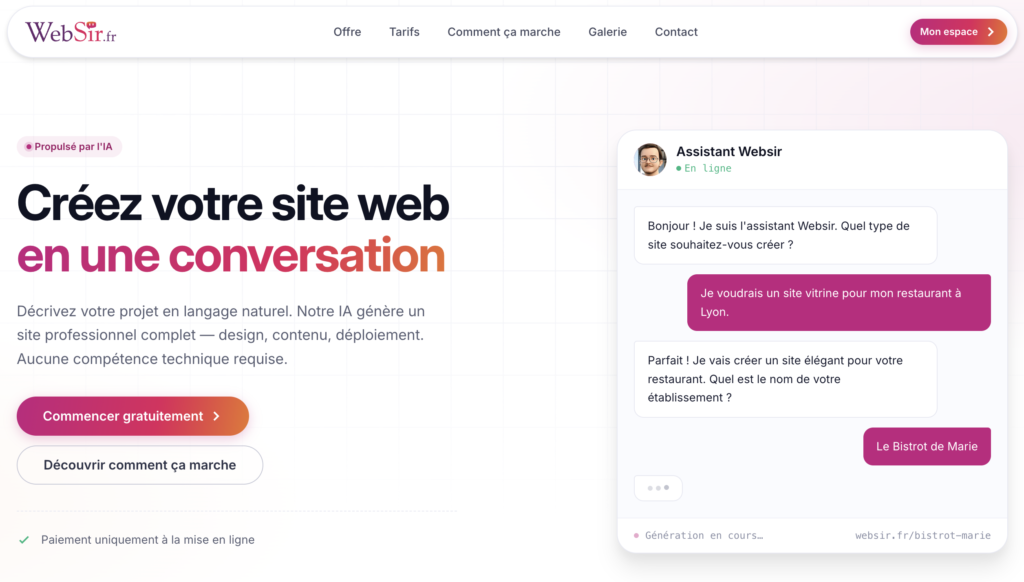
The WebSir landing page, the user describes the project to the conversational assistant, in French, and generation starts. Suggested alt text: “WebSir home page with the chat interface used to create a business website in conversation with an AI”.
Why yet another AI website generator?
As a developer, I watched the same request come in for years from tradespeople, freelancers and small firms: “I just want a simple site, one that loads fast, where I can change a phone number without ringing someone up”. The industry’s answer was WordPress plus an Elementor theme, or more recently Wix, Webflow and friends. The problem is the same either way: the stack is heavy, the client-rendered DOM is bloated, and the smallest editorial change means finding your way around a visual interface with the complexity of a budget Photoshop.
Once LLMs became good enough to produce structured HTML and CSS, I wanted to take the problem from the other end: rather than teaching the user to drive a builder, ask them to describe what they want in their own words. And behind that, not generate one more WordPress site, but pure static HTML, served from the edge, with no client-side JavaScript framework. That is how WebSir came about.
The user journey, seen from the outside
The user signs up (email and password, Google, Facebook or Apple), types something along the lines of “I am an osteopath in Lyon, I want a plain site, sage green, with an about page, a pricing page, a contact page and a legal notice page” and the chat takes it from there. The agent gathers the details it needs (colours, tone, sector, page structure), then starts the generation. Progress is streamed live: the user watches the AI work through each step, structure, content, design, code, assets, validation, instead of guessing what is going on inside the black box.
A few minutes later the site is ready to preview. The user can then ask for changes (still through chat, never through an imposed visual editor), adjust the images, the colours, the page tree. Once happy, they enter a five-step deployment flow: SEO, domain, social, payment, contact. Stripe only comes in at the payment step: generating a complete site is entirely free, only the actual deployment triggers billing. A deliberately radical freemium model: if the AI cannot produce a site the user likes, the user has spent nothing.
Under the bonnet: WebForge, the generation engine
This is where it gets interesting for developers. WebForge is a standalone Node.js / TypeScript binary that I designed specifically for this use case. It orchestrates the whole build: parsing the brief, writing the content, picking the design, assembling the code, optimising the assets and running the final validation. Everything is driven internally, and progress is exposed to the web application in real time, so the user is never left staring at a silent spinner.

The WebSir editor during a generation: the left-hand column shows the WebForge phases live (writing the code, validating the template, QA), the centre panel shows the site being assembled. Suggested alt text: “WebSir editor showing the WebForge generation phases live and the preview of the business website being created by the AI”.
Several phases you can watch during generation
Rather than asking a single monolithic call to produce a complete site (the classic recipe for a disappointing result), WebForge chains several specialised phases. You literally watch them go by in the left-hand panel while the site is being generated.
Some of those phases are driven by the AI, the ones that call for creative or editorial judgement (framing the project, writing the content, choosing the design, producing the code). Others are entirely deterministic, with no LLM call at all: they handle the build, the validation and the self-correction. They are the ones that catch the usual mistakes of an AI generation, a CSS class that does not exist, a forgotten slot, an inconsistent colour palette, a page rhythm that stacks the same section twice.
The upshot of that split is simple: creativity stays with the AI, rigour stays with tested code. That is the key to shipping an AI-generated website that does not hallucinate, and that comes out of the pipeline with a reproducible level of quality rather than a roll of the dice.
A purpose-built toolbox for the agent
The AI agent does not write the site “by hand” in raw completion mode. It has a typed toolbox that I defined specifically for producing business websites: reading, writing and editing files, instantiating components from an internal library, validating templates, and a whole battery of image tools (illustration generation, logo generation, favicon generation, image editing, background removal).
The agent picks the relevant tools itself depending on the phase it is in, and a subset of tools is restricted by context, you do not want a critical review phase quietly rewriting code, for instance. That discipline around tooling is what separates a demo posted on Twitter from a product that holds up in production.
Once the site is generated, the user can of course carry on talking to the AI through chat, but they can also click straight onto any block on the page and edit it in context: change a heading, tweak a call to action, swap an image. The editor keeps track of the structure (hero, services, testimonials, footer, and so on) and offers the edits that suit the type of block selected.

Direct visual selection of a “hero” block on a generated site: the user clicks the area to change and the editor applies the edit without breaking the structure. Suggested alt text: “In-context editing of a hero block on an AI-generated business website in the WebSir editor”.
Why static HTML in 2026?
Plenty of comparable platforms produce a monstrous JavaScript application (Wix easily loads 2 to 3 MB of JS on the first page). WebSir does the exact opposite: the generated sites are HTML / CSS / vanilla JS ES2022+. No client-side framework. No React, no Vue, no Alpine.js, no jQuery. The rule is enforced by CI: a script blocks any merge that would bring a banned dependency back in.
Measurable consequences:
- Minimal LCP, no hydration, no JS bundle to parse before the content shows up
- Immediate FID, very little JavaScript on the main thread
- Light bundle, a few kilobytes of JS for the interactions (mobile menu, accordions), no more
- Accessibility by default, no virtual DOM, the HTML reads as it is to screen readers and SEO crawlers
- Robustness, a site that still works perfectly with JS turned off
On the infrastructure side, the site is served through a global edge CDN. In practice, every page is served from the point of presence closest to the visitor, wherever they are in the world. No application server to scale, no cache to invalidate by hand: the upload, the meta tag injection, the DNS configuration and the cache purge are fully automated on every redeployment. Custom domains are set up in a few clicks, with an automatic SSL certificate.
Typed variables: a step ahead on GDPR
This is probably the part I am proudest of technically, and the one other platforms do not do. Every recurring piece of public data on a site, phone number, email address, postal address, company registration number, hosting provider, current year, goes through a <var data-key="…"> tag or a data-bind-{attr}="key" attribute.
The LLM never sees the real value. WebForge only receives the keys and their metadata (label, type, required or not). The actual substitution happens afterwards, at deployment time, through a rendering engine that injects the values just before publication.
The practical benefits: real personal data never passes through a third-party AI provider, you can change a phone number across an entire site in one operation, and you can raise a “sensitive data” flag that triggers extra encryption on variables that are not meant for publication. For anyone trying to generate a professional business website with AI while staying GDPR-compliant, that split between content and data is decisive.
Security and operational hygiene
A few details that matter on a developer blog:
- TOTP 2FA is mandatory
- Two-tier brute force protection: 5 failed attempts lock the account for 15 minutes
- Contact forms protected by several layers, including a honeypot, a minimum fill-in time, disposable domain rejection, MX checks and Turnstile, 100% automated
- File uploads in forms: MIME whitelist, maximum size per submission, ClamAV on the server side
Why an AI-generated website can beat a hand-made one
The intuitive argument goes: “a human always beats a machine on the creative side”. That is still partly true for design, but it is less and less true for technical performance, which is the real playing field of modern SEO.
A freelancer delivering a Webflow site or a patched-up WordPress theme has little chance of beating, on Core Web Vitals, a pipeline that is designed from the start to generate optimised static HTML, validated by a battery of deterministic checks and deployed to a global edge. Add to that:
- Schema.org markup injected systematically on every page (LocalBusiness, Article, BreadcrumbList depending on the context)
- A sitemap.xml generated and submitted automatically
- Open Graph and Twitter Card meta tags configured at the “Social” step of the flow
- Built-in analytics with no external SDK to load
- Images served as WebP or AVIF when the browser supports them
…and you end up with a site that, with no extra effort, already ticks the main Google Page Experience recommendations. When a crawler turns up, it finds readable HTML, not a React skeleton waiting to be hydrated. When a visitor clicks, the page renders in a few hundred milliseconds from the nearest point of presence.

Google Lighthouse audit of a business website generated by WebSir: 100/100 on Performance, Accessibility, Best Practices and SEO. No manual tuning, the score comes straight out of the generation phase. Suggested alt text: “Google Lighthouse score of 100/100/100/100 on a business website generated by the WebSir AI, measured on Performance, Accessibility, Best Practices and SEO”.
Pricing and discount code (the bit you were waiting for)
The plan currently on offer is simply called Site vitrine. €39.90 excl. VAT per month, with a yearly option at €430.92 excl. VAT per year that saves 10%. It includes:
- Up to 20 pages, legal notice and privacy policy included
- A custom domain or a subdomain on
*.websir.fr - An SSL certificate managed automatically
- A global edge CDN
- Built-in analytics with no cookie banner to display
- Unlimited contact forms, with file uploads and anti-spam
- Unlimited changes through chat (the AI stays available after publication)
- Email support
And here is the part that made me write this article today: for the readers of this blog, I have set up a discount code worth 20% off the first subscription.
Discount code: SITE20
20% off, to be entered at the Checkout step of the deployment flow.
As a reminder: generating the site is free. You can create an account, brief the AI, see the full result, ask for as many changes as you like, and only use the SITE20 code when you actually decide to publish the site. If you do not like what comes out, you will not have spent a thing.
What is not in WebSir (yet)
In the interest of honesty, here is what does not exist today. The dynamic site and e-commerce plans are on the roadmap but are not available yet. The target technology is not settled, I already know what I will not use (neither WordPress, nor PrestaShop, nor Shopify) but not yet what I will pick. If you need an online shop or a business back office today, WebSir will not be the right answer, I would rather tell you before you enter your card details than after.
In the same vein, WebSir targets the French-speaking market first. Generated content is in French by default, the legal pages follow French law, and the conversational agent understands briefs in French better than in other languages. Multilingual support will come, but it is not the current priority.
Conclusion: what this changes for a developer
If you are a developer and your non-technical friends still ask you “can you knock me up a little site”, you know how tiresome that request gets when you are doing it for free. Pointing them at WebSir for the “professional business website online quickly, with a domain and contact forms that work” need gives you your weekend back. And if you are a freelancer yourself, taking on business-website work as a subcontractor, you can use WebSir as an accelerator: let the AI produce the base, and bill your client for the customisation time.
The SITE20 code is valid for every reader of this blog. Head over to websir.fr, create an account, describe what you want and watch the pipeline run. If you want to dig into the technical side, WebForge probably deserves an article of its own, say so in the comments and I will go through the template system and the self-correction mechanism in a future post.
Written by the creator of WebSir, for developers who want to understand what really happens when you generate a business website with AI in 2026.